
One of the things that slows course creators and coaches down more than anything else is creating images.
Which is unfortunate because, without images, your business will effectively come to a screeching halt.
Marketers use original graphics 34% of the time. This type of visual content was most effective in helping them reach their marketing goals in 2019. (Venngage)
Now, I know you aren’t a graphic designer. And it doesn’t seem like creating graphics is all that important.
But let’s take a look at where you will be using graphics.
Your website. Social media. Emails. Course workbooks. Course promotion. Sales funnel pages. Course delivery pages.
Pretty much everything you do will require some sort of graphic involvement.
And the reality is, the better the graphics, the higher your conversion.
There are literally dozens of reasons this is true. And most of them don’t matter for purposes of this conversation.
What matters now is that you know graphics are important.
“There are three responses to a piece of design - yes, no and WOW! Wow is the one to aim for.”
Milton Glaser
Which means you have a couple of choices.
- Hire out your graphic creation to someone so that you don’t have to worry about it. This is a great strategy for you if you can afford it and, as they say, if you have more money than time.
- Do all the graphic design yourself. This is great if you have more time than money.
- Do some yourself and hire out the tough stuff. (This is my personal preference) This also allows you to create content more quickly than you could if you were waiting for others to do everything on their timeline.
Let’s say, for the purposes of this conversation, that options 2 or 3 will work best for you.
Now what?
You aren’t an Adobe wiz. In fact, the programs can look a little intimidating if you’ve never used them before.
And all that talk of masks and filters and everything else is just way too overwhelming for you to actually accomplish anything.
So, what’s the best answer for you to get things done?
Canva!
I’m sure you’ve heard of it. You may even have looked at it before and gotten overwhelmed with the choices.
Not to worry. We’re going to break down the Need to Know info right now so you can jump in and start creating what you need to run your business.
The first question I get when I send coaching clients to Canva is “Do I need the paid version” and my answer is always no.
Canva is a powerful and accessible program as is, without any upgrades.
If you do need any additional features, here is a list of their current pricing as of Q1, 2021:
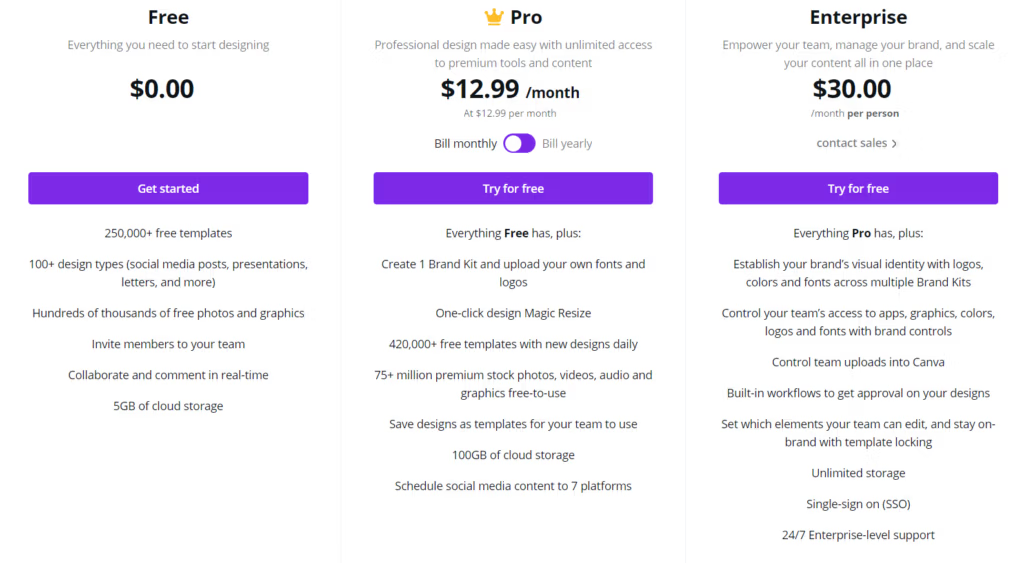
You can see, with the Free version you have plenty. If, however, your needs exceed what is offered there you can look at either Pro or Enterprise to fulfill your needs.
For purposes of this article we will assume you are working on the free version.
Brands have a very short amount of time to make a strong first impression. Visual appeal can be assessed in about 50 milliseconds. (https://ddiy.co/graphic-design-statistics/)
Ok, so there are really only a few steps to creating amazing images that are branded for your company.
First, choose a template. Canva makes it really easy to find one. There’s a search bar on their homepage that you can just type in what you want to create. Let’s choose an Instagram post.

Once I type Instagram into the search bar the first option is Instagram Post, so select that one.
Now comes the fun part. If this is your first time using it you will get a tour. Follow the steps in the tour. They will guide you through the key features that you need in order to create your first graphics.
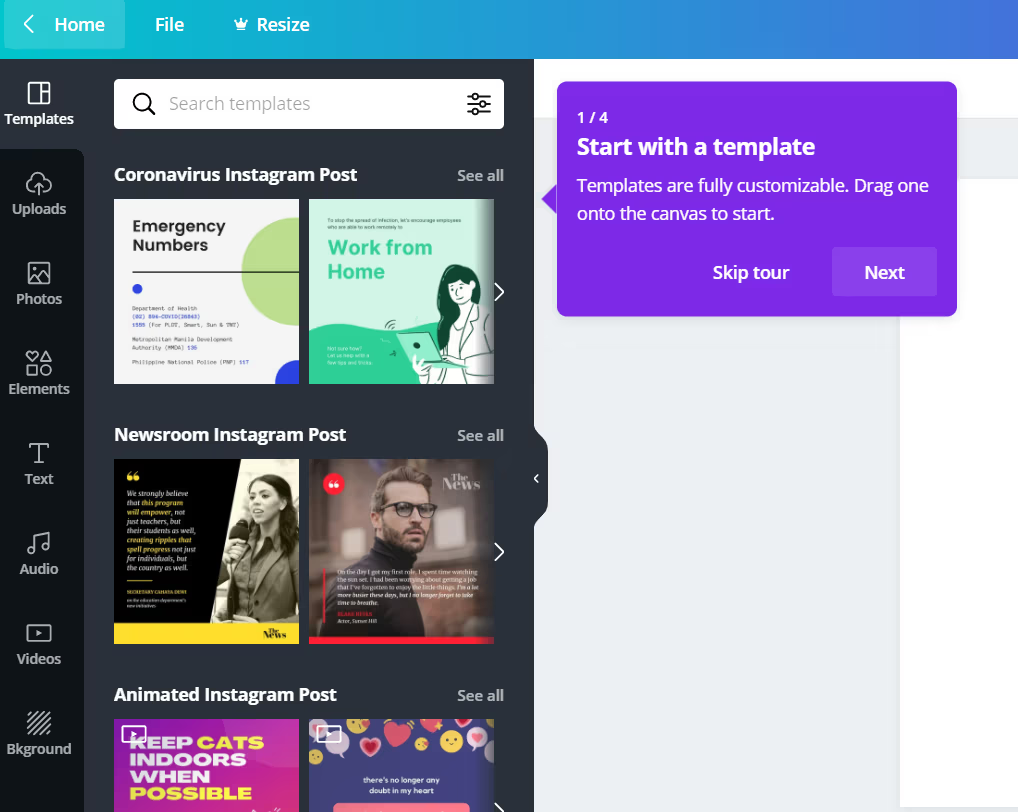
It is all pretty self explanatory from here. You can grab a template, customize any elements like images, text, font, colors, etc.
If you don’t see any editing options, simply click on a “component” of your image and you’ll see what you can do.
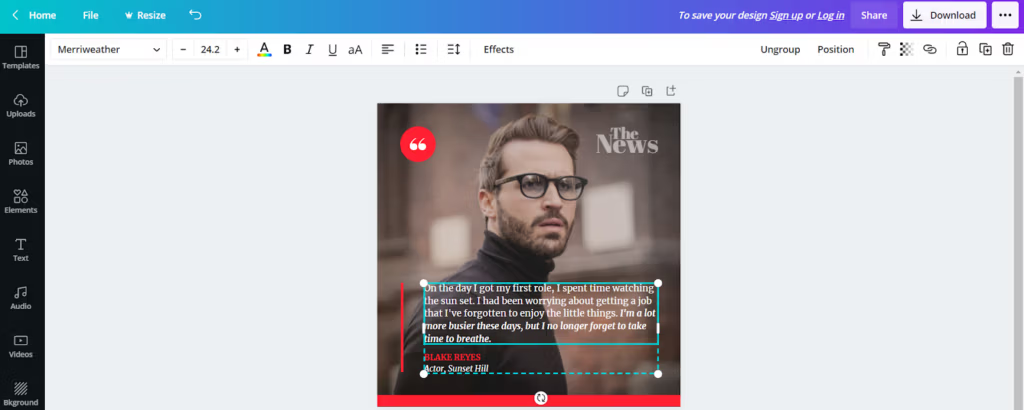
And here’s how I teach my clients to get familiar with it.
Don’t start out by creating an image that you’ve got to get right.
Start out with some fun images. Something that, if it turns out, you would put on your personal page or send to a friend. Nothing serious. Nothing with any consequences.
Just something you can play with.
“It’s through mistakes that you actually can grow. You have to get bad in order to get good.”
Paula Scher
Grab a template, start selecting components, then start clicking the buttons that show up on the top ribbon to see what they do.
Remember, you can’t break anything here. It’s like playing in the sandbox when you were a kid. Grab the buckets and shovels and cups and see what you can build.
Visual dimension is the #1 influencing factor that affects the purchasing decision for 92.6% of people. (Kissmetrics)
If you like it you can show your friends. If you hate it you can break it down and start over with new sand.
No pressure. No grades. No right or wrong.
Just play time.
User experience is incredibly important for website design. When you invest in user experience through a site that is beautiful and functional, you earn a $100 return for every $1 spent. (WebFX)
Now, I also recommend you set a timer. Because an hour can fly by if you really start playing with this. 🙂
Once you have something you’d like to share somewhere you have some options. Canva keeps improving their platform and creating updates to give us more of what we say we want.
You can download your image. You can share your image. You can do pretty much anything you want to with your image.
Straight from Canva.
Pretty cool, right?
As of June of 2020 Canva had 30 million monthly active users. (Techcrunch) And that many people can’t be wrong!
So go ahead. Block out an hour of your day today or tomorrow and dig into Canva. See what you can create.
Dive in, get your hands dirty, and see what kind of sand castle you can build.
You’ve got nothing to learn and a lot of fun to gain!